Cut list optimiser · sheet, bar & tubeNewcastle upon Tyne

Know what to order before you cut.

Put in your cut list and the sheet and bar sizes you buy. CutNest nests every part, tells you exactly what to order and what it costs, and turns the job into a quote for your customer.

No account · nothing to install · your cut lists stay on your computer

Sheet metal · joinery · signs & acrylic · bar & tube · decking

ABCD24501150113344444422222324444442114242244NO.PARTSIZEQTY1Cover600×40042Bracket300×200103Base plate450×45034Gusset150×15016DRAWN BYCutNestMATERIALMild steel 2mmSHEET1 of 1USED90% · kerf 4CHECK✓ fewest sheets
A real result, not a mock-up: the sample job in the demo below, drawn the way it’s cut.

Try it on a real job

Pick a sample, change any size or quantity and press Calculate. It’s the same engine as the app. No sign-up, and nothing leaves your browser.

Job sheetNewcastle upon Tyne
Material
316 brushed stainless
Quoted
4 sheets
Nested by CutNest
3 sheets
Saved on the first job
£225
3, not 4

Why I built it

I work in sheet metal fabrication. Every week we’d quote a job, order the steel, and end up with offcuts we couldn’t use. The first job I ran through CutNest was quoted at four sheets of 316 brushed. It went on three.

The same thing happens with ply, MDF, acrylic, box section and decking. If you cut from stock, a proper cut list pays for itself.

Ryan, sheet metal fabricator, Newcastle upon Tyne

Using CutNest? Tell me how it went →
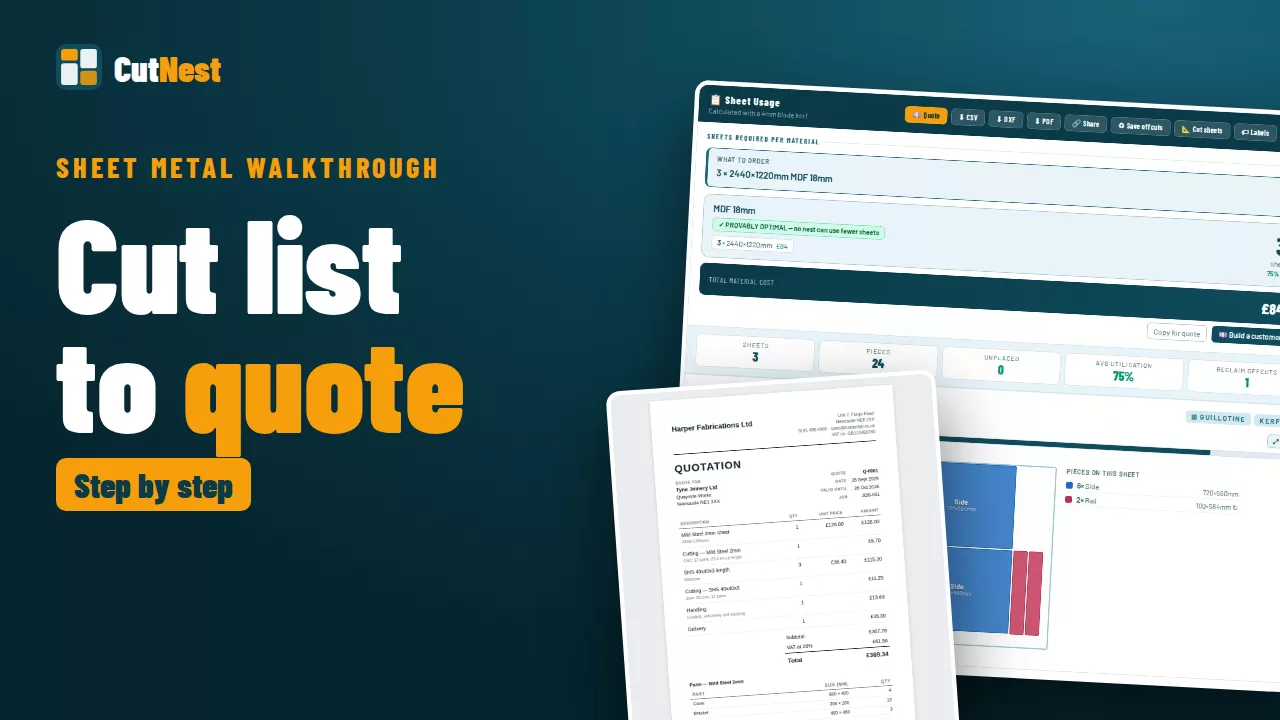
Cut list to quote in 77 seconds

Video: sheet metal cut list to customer quote, step by step

316 brushed stainless, from a pasted cut list to a quote on your letterhead. Plays from YouTube. Watch on YouTube · More videos

  1. Paste the cut listType it, paste it from an email, or open the CSV or Excel file. Millimetres, or inches and fractions.
  2. CalculateThe fewest sheets or bars on the sizes you buy, checked against a lower bound. When it’s the minimum, it says so.
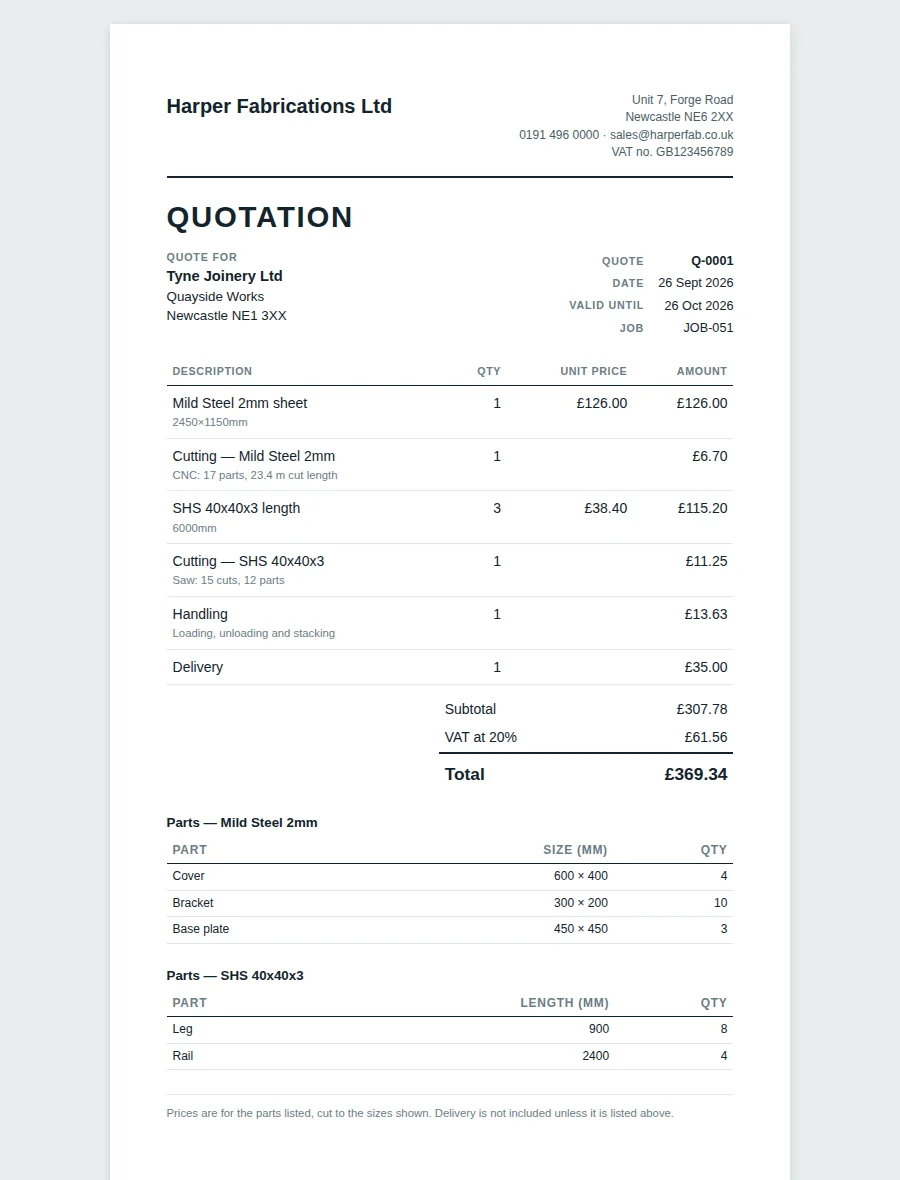
  3. Order, cut and quoteWhat to order and what it costs, every sheet drawn for the shop floor, and a quote on your letterhead with Pro.

By trade

Free calculators

What it does

Proof, not a guessAll plans

Every result is checked against a mathematical lower bound. When CutNest reaches it, the result is marked provably optimal: no layout, from any software, uses fewer sheets or bars. When it can’t prove it, it says so.

Bar, tube & extrusionAll plans

Cut to length from the stock lengths you buy, with the fewest bars, a saw list for every pattern, and the offcuts worth keeping marked.

Bring your cut listAll plans

Open a CSV or Excel file, or paste from an email. CutNest finds the name, size, quantity and grain columns itself. The file is read in your browser and never uploaded.

Customer quotesPro

Material with your markup, cutting time from the actual layout, handling, extras and VAT, on a quote with your logo, ready to send.

Grain lockPro

For brushed stainless, veneered board and woodgrain. Lock a whole material, or part by part: the doors stay with the grain, the shelves can turn.

Shop-floor paperworkPro

Dimensioned cut sheets and saw lists for the machine, PDF and DXF, and a numbered label for every part.

What’s new

  1. Bend allowance and board foot calculators. The flat length of a bent part from its K-factor, sent straight to nesting, and board feet and cost for lumber. Try it
  2. Repeated sheets shown once. Identical layouts are drawn once and marked with how many to cut, so a long job reads at a glance. Clearer, sharper text across the app.
  3. Free cutting cost calculator. Price a laser or plasma job from your own speed and rate, with a price for each part. Try it
  4. A clearer answer. Results open on what to order, priced line by line and marked when it is proved the fewest sheets, with every sheet drawn like a workshop drawing. Free users see what Pro would save on their own job.
  5. Deck planner (Pro). L-shaped decks, steps, borders, posts and bearers, timber against composite, a quote per square metre, and the deck plan printed with the saw lists. See it

Free for the odd job. Pro for every week.

Pro starts with 14 days free and stops whenever you cancel.

Free
£0
No card needed · forever free
  • ✓The full nesting engine, proved optimal when it is
  • ✓Jobs up to 50 parts, 1 material, 2 sheet sizes
  • ✓Bar, tube & extrusion cut to length
  • ✓Open CSV & Excel cut lists
  • ✓Layouts on screen & CSV export
  • ✓Millimetres or inches, 19 currencies
  • Printed cut sheets & PDF
  • Customer quotes
  • Bigger jobs & several materials
Start free →

Secure payment via Lemon Squeezy · VAT added at checkout where applicable · Licence key emailed instantly

Compare every feature, Free and Pro →

Questions

Yes, that’s the point of it. Go to Library and enter your sheet sizes and prices: steel, MDF, ply, acrylic, glass, whatever you work with. CutNest uses your actual numbers. Free handles 2 sizes per material; Pro handles up to 12, picks the cheapest mix, and can be told how many of each size you actually have. Pro users also get a pre-built library of common UK grades as a starting point.
Yes, on every plan. Add a bar material in your Library with the stock lengths you buy (for example 6m and 7.5m), their prices, and optionally an end trim and your saw’s kerf. Enter the lengths you need and CutNest works out the fewest bars (or the cheapest mix of lengths), shows each cutting pattern once with how many bars to cut that way, and prints a saw list with the offcuts worth keeping. Pro users can put sheet and bar materials in the same job.
With Pro, yes. After you calculate, Quote works out the cutting time from the actual layout (the saw’s cut sequence, a laser or router’s cut length and pierces, or the number of saw cuts on bar) at the speeds you set per material, then adds handling, setup, any extra lines, your markup on material and VAT. It prints as a quote with your logo and business details, numbered and dated, ready to send.
Yes, on every plan. Click Paste list, then Open a file, and choose a CSV or Excel (.xlsx) file. If the first row has headings like Name, Length, Width, Qty and Grain, CutNest uses them to find the right columns; otherwise it reads each row as name, width, height, quantity. You see a preview before anything is added. The file never leaves your computer.
No to both. Open cutnest.co.uk/app in any browser and start using it. Your library and job history are saved in your browser. Nothing is sent to a server. For Pro, you just enter a licence key in Settings after purchase.
Pro starts with 14 days free in the app: tap Try Pro free and it switches on straight away, with no card and nothing to fill in. To keep it after that, subscribe: Lemon Squeezy takes the first payment then and emails you a licence key within a minute. Open the app, tap Settings, paste the key and Pro stays on. One key covers your whole company, so share it with your team.
Go to cutnest.lemonsqueezy.com/billing and sign in with the email you used at checkout; you’ll get a sign-in link by email. Choose your CutNest Pro subscription and cancel it; Pro stays on until the end of the month or year you’ve paid for. The free trial needs no cancelling: it simply ends after 14 days and nothing is charged. The same link is in Settings in the app, or email hello@cutnest.co.uk and we’ll cancel it for you.

More questions: grain, guillotine, labels, inches →

Try Free → Pro: 14 days free